ZKTeco Attendance Management Software — in the Cloud
M1 TimePilot turns your ZKTeco biometric devices into a real-time cloud attendance system for UAE businesses — with no on-site server, no desktop software, and no manual exports.
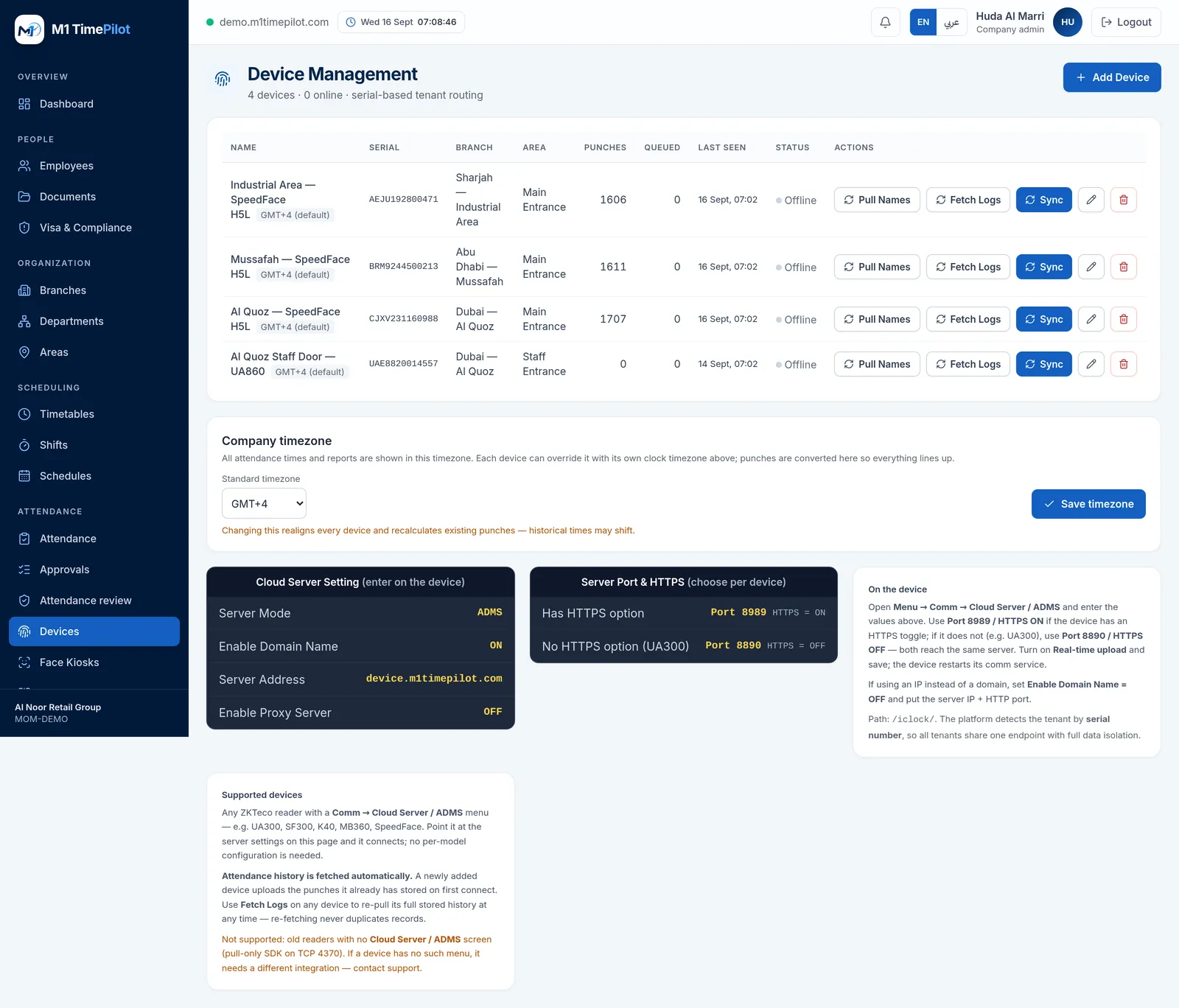
Cloud software for your ZKTeco hardware
If you already run ZKTeco fingerprint, face-recognition or card readers, M1 TimePilot is the software layer that makes them effortless. Instead of plugging devices into a Windows PC and exporting punches by hand, each device pushes attendance straight to the cloud over ADMS / Cloud Push. You manage everything — employees, branches, shifts, attendance rules and reports — from any browser.
It is purpose-built for the UAE: multi-branch operations, night and cross-midnight shifts, overtime and payroll rules, and WPS-ready exports for wage processing.
Not just ZKTeco — any ADMS / Cloud-Push device
ZKTeco is where most UAE businesses start, but M1 TimePilot speaks the open ADMS / Cloud-Push protocol used across many biometric brands.
Fingerprint devices
ZKTeco and compatible fingerprint terminals sync punches in real time.
Face-recognition terminals
Contactless face devices supported through the same cloud connection.
RFID / card readers
Card and badge readers register attendance the same way.
How ZKTeco cloud push works
Four steps from a boxed device to live attendance.
1 · Register the serial
Add the device serial number under Attendance → Devices.
2 · Point it to the cloud
Set the device Cloud Server to device.m1timepilot.com, port 443, HTTPS on.
3 · Punches flow in
Every check-in, check-out and break syncs automatically in real time.
4 · Rules do the rest
Shifts, overtime and payroll rules turn raw punches into ready reports.
No desktop software
Replace the old ZKTeco PC software and local database — nothing to install or back up.
Multi-branch, one dashboard
Devices across every location roll up into a single live view.
WPS & payroll ready
Attendance converts into payroll-ready and WPS-ready exports for the UAE.
Remote & work-from-home attendance
A mobile app is on the way, so staff working from home or remote sites can clock in from their phone with location capture — the same rules, shifts and reports as your biometric devices, for teams that aren't at a fixed terminal.
ZKTeco cloud attendance — FAQ
No. It works with ZKTeco and any biometric or RFID device that supports the ADMS / Cloud-Push protocol. Devices push punches straight to the cloud, so there's no on-site server or PC software to maintain.
Register the device serial under Attendance → Devices, then set the device Cloud Server to device.m1timepilot.com on port 443 with HTTPS on. Punches appear in real time.
No. M1 TimePilot is fully cloud-based. Unlike the traditional ZKTeco desktop software, there's nothing to install and no local database to back up — you only need a browser.
A mobile app for remote and work-from-home attendance is on the roadmap, letting off-site staff clock in from their phone with location capture alongside your existing biometric devices.
Put your ZKTeco devices in the cloud
Start a free 7-day trial — connect your first device in minutes. No credit card required.