Attendance types, shifts and the rules behind them
Six punch types, six shift types, ten day statuses and the rules that turn a pile of punches into a timesheet you can pay from.
Four things people mean by “attendance type”
They are genuinely different, and conflating them is how timesheets go wrong.
1 · How they punched
Biometric terminal, face kiosk, rotating QR, GPS, mobile face, web, card or RFID on the terminal, or a manual entry made by HR. Every method feeds the same engine, so the rules do not change with the door someone used.
2 · What the punch meant
Check-in, check-out, break-out, break-in, overtime-in and overtime-out. ZKTeco terminals send these as status codes and the platform maps them, so a break is never mistaken for the end of a shift.
3 · What kind of day it was
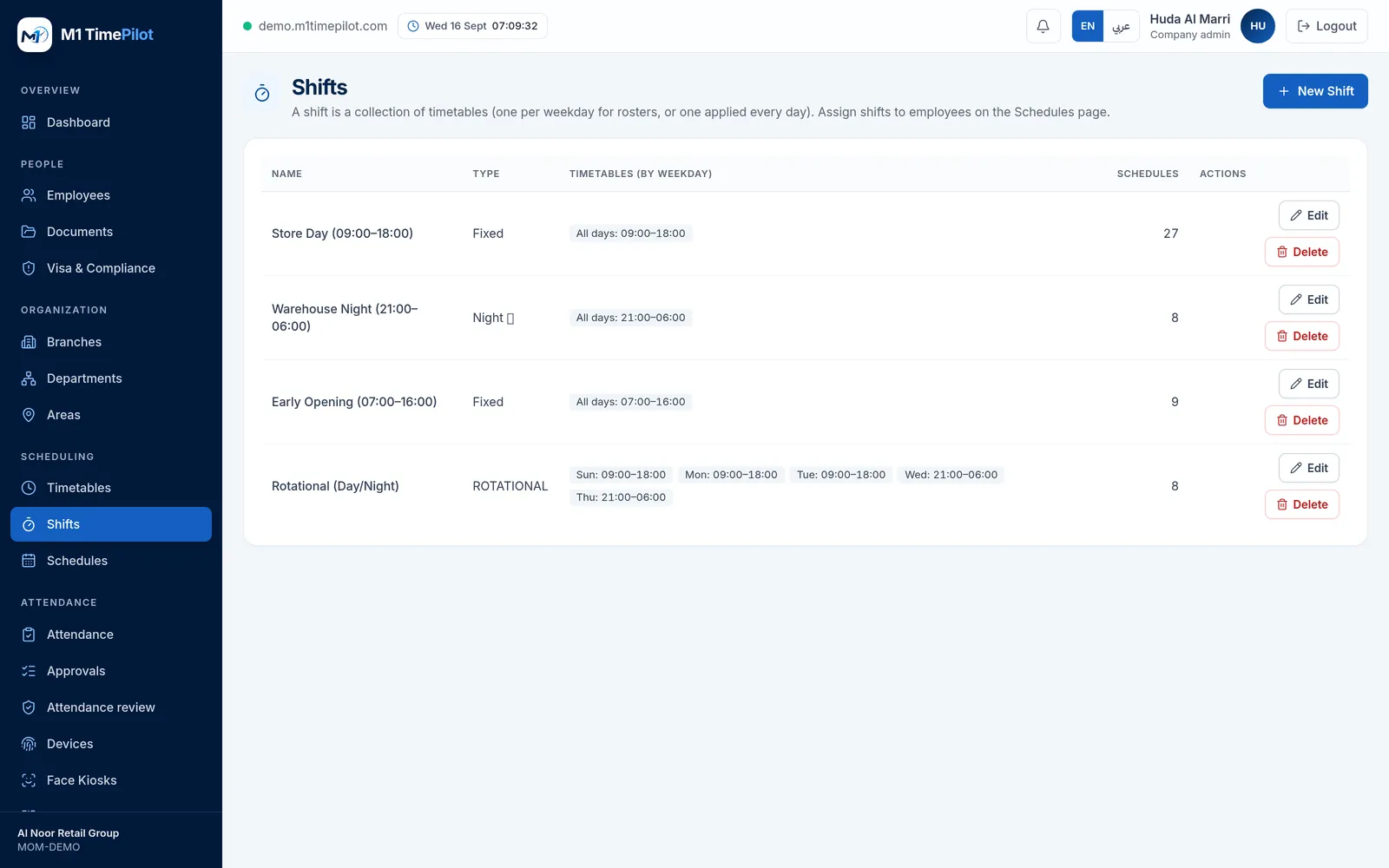
Fixed, flexible, rotational, split, night and 24-hour. A night shift crossing midnight stays attached to one shift date instead of being torn in half.
4 · How the day ended up
Present, absent, late, early out, half day, weekend, holiday, paid leave, unpaid leave, or missing punch. That final status is what payroll reads.
Timetables, shifts, schedules
Three layers, because a roster is not one thing. A timetable is a single work period. A shift combines timetables across the week, so Sunday to Wednesday can be days and Thursday nights. A schedule assigns a shift to a person over a date range.
The rules you can actually change
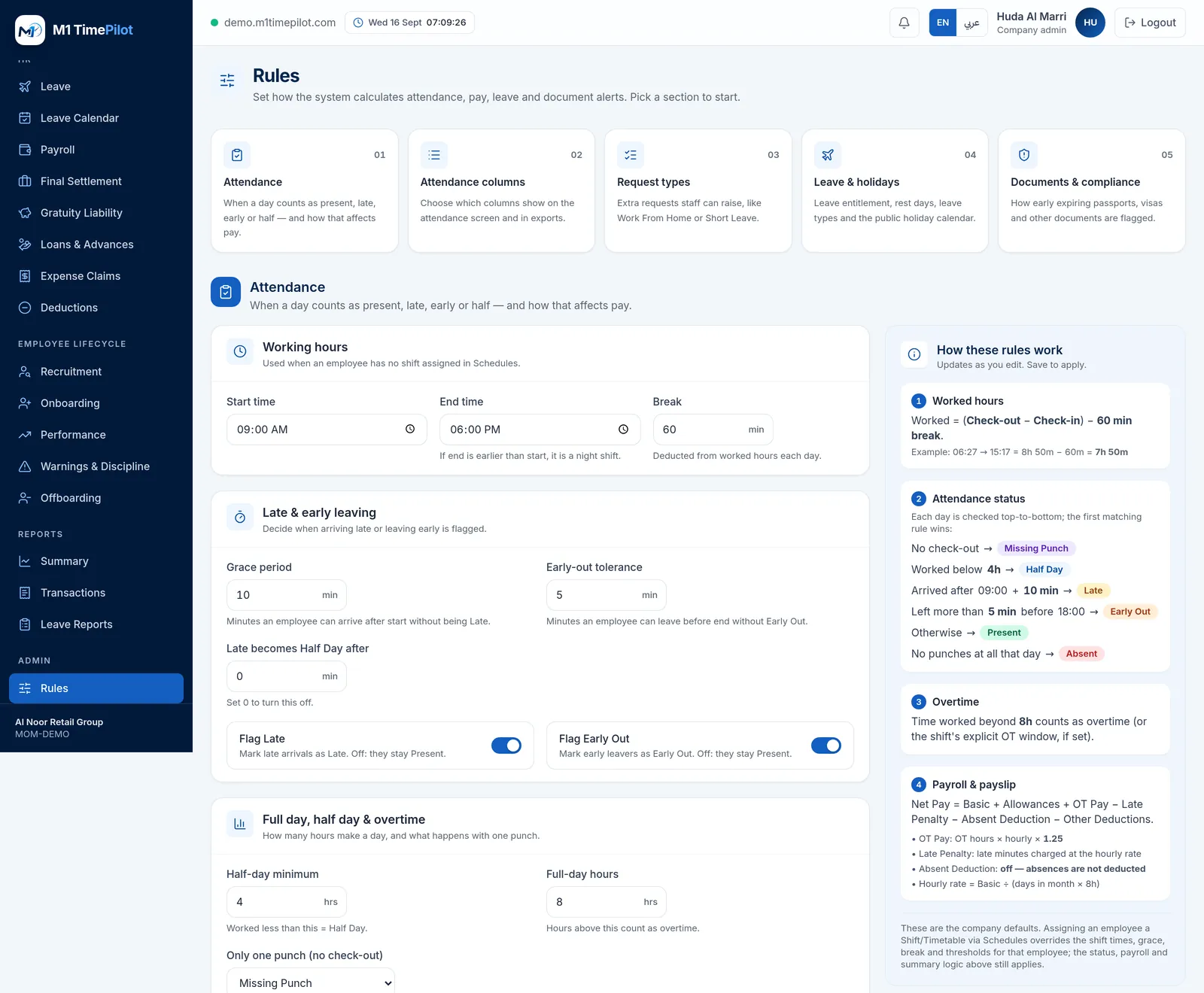
Set once for the company, overridden per timetable or shift where a site needs something different.
Timing
Default start and end, grace minutes, early-out grace, break minutes, and explicit break and overtime windows per timetable.
What counts as a day
Minimum hours for a half day and for a full day, what a single lone punch should be treated as, and whether lateness past a threshold turns the day into a half day.
Money
Whether overtime is eligible and paid, the overtime multiplier, a late penalty per minute or proportional to the hourly rate, and whether an absent day deducts basic salary.
And one thing it deliberately does not do
There is no punch rounding. M1 TimePilot does not quietly move a 09:04 to 09:00 or a 17:56 to 18:00. The punch is what the device recorded, and tolerance is expressed as a grace period you set and can show to an employee — not as an invisible adjustment to their times.
Frequently asked questions
Four different things get called that. How someone punched (the capture method), what the punch meant (check-in, break, overtime), what kind of day they were working (fixed, night, rotational and so on), and how the day was finally classified (present, late, half day, absent). M1 TimePilot models all four separately.
Yes, and it attributes the whole shift to one shift date rather than splitting it across two days. That single decision is what makes night-shift payroll add up.
Yes. There is a company default, and each timetable or shift can override the grace period, the early-out grace, the break minutes and the minimum hours for a half or full day.
No. There is no punch-rounding rule in M1 TimePilot. Times are recorded as they came from the device, and lateness is measured against the grace period instead.
Yes — flagging late and flagging early-out are both switches, as is the late penalty. Nothing is forced on you.
If you switch on deducting a day's basic salary for an absence but have not configured rest days, the system tells you, because it would otherwise deduct for every weekend and public holiday.
Ready to get started?
Start a free trial, or talk to us about your sites, devices and shifts.