ADMS / Cloud Push attendance
Your terminals send their punches straight to the cloud. No PC in the corner running collection software, no local database to back up, and no exports to forget.
Why push beats pull
Nothing to install, nothing to leave running
The old way puts software on an office PC that must stay switched on to collect punches. With ADMS the device initiates the connection, so the only thing that has to be running is the terminal itself.
Real time, not end of month
Punches arrive as they happen, which is what makes a live dashboard and same-day approvals possible. Collection software gives you yesterday's data at best.
One endpoint, isolated by serial
Every tenant points at the same address and the device's serial number decides whose data it is. That is why adding a device is entering a serial, not typing a pairing code on a small screen.
History comes with it
A device added today uploads the punches it was already holding. Re-pulling that history later never duplicates a record, so you can do it whenever you suspect a gap.
No punch is thrown away
If a PIN arrives that the directory does not know, an employee record is created rather than the punch being dropped. You can merge it afterwards; you cannot recover a discarded punch.
Your existing hardware counts
Any ZKTeco reader with a Comm → Cloud Server / ADMS menu works, whoever you bought it from. See the devices we supply →
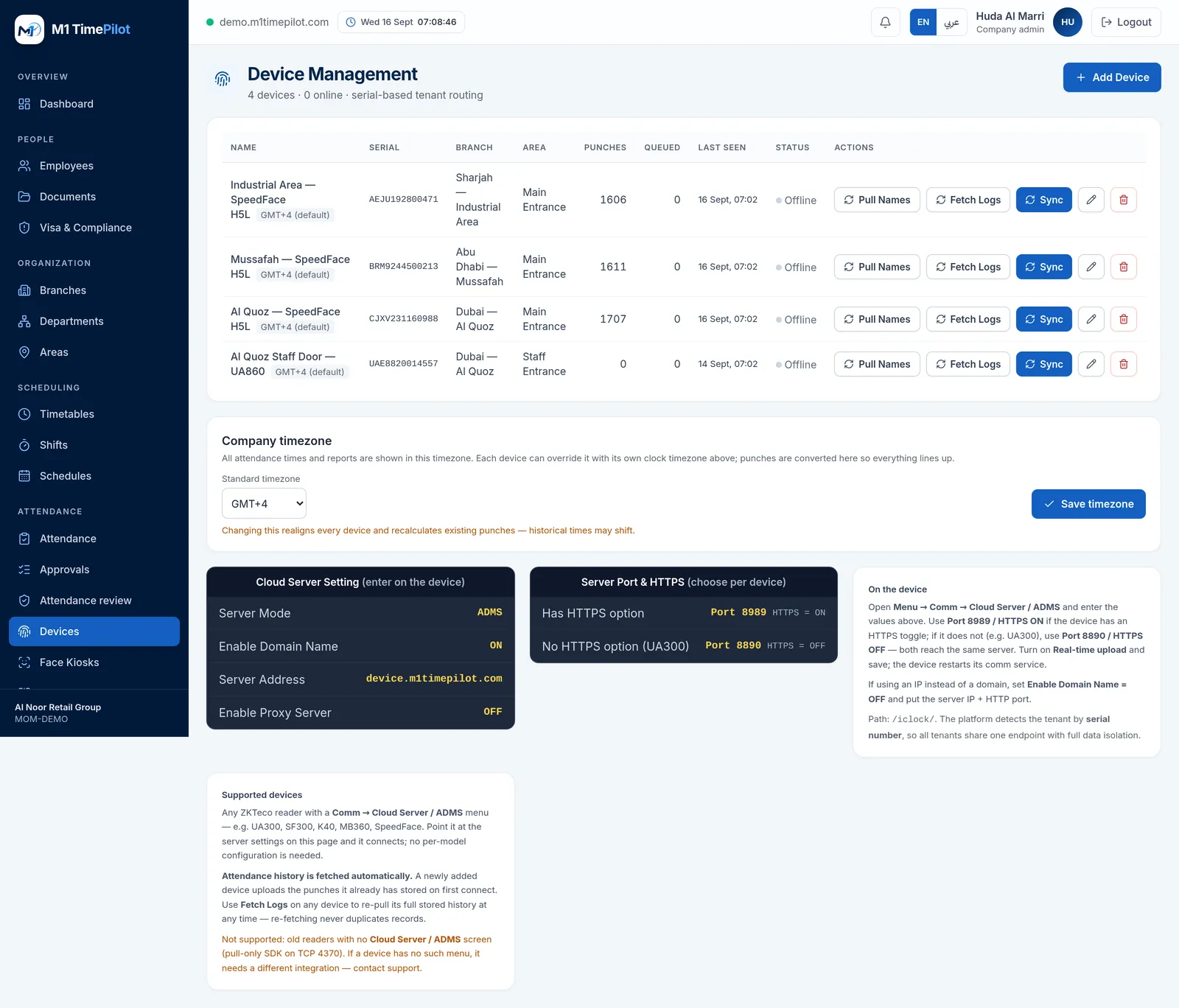
What you actually type into the device
Four settings on the terminal, and one serial number in the app. The Devices screen shows both halves side by side so you are not switching between a manual and a browser tab.
| Server Mode | ADMS |
|---|---|
| Enable Domain Name | ON |
| Server Address | device.m1timepilot.com |
| Server Port | 8989 with HTTPS on, or 8890 with HTTPS off |
| Enable Proxy Server | OFF |
Frequently asked questions
ADMS — also called Cloud Server or Cloud Push on the device menu — is ZKTeco's protocol for a terminal to send its punches to a server over the internet, instead of waiting for software to come and collect them. The device does the reaching out, so nothing needs to be installed on a PC and no port needs opening on your network.
By the device's serial number. Every tenant shares one endpoint and the serial identifies the company, which is why adding a device is just entering its serial — there is no pairing code to type on the terminal.
8989 with HTTPS on, if the device has an HTTPS toggle. 8890 with HTTPS off if it does not — some models, like the UA300, have no such option. Both reach the same server, and the Devices screen shows you which to use.
They are uploaded on first connect. A newly added device queues a history fetch automatically, and you can re-pull the full stored history at any time — re-fetching never creates duplicate records.
An employee record is created automatically so the punch is kept. A punch is evidence of attendance; discarding it because the directory is out of date would lose something you cannot get back.
Older pull-only readers that expose nothing but an SDK on TCP 4370 and have no Cloud Server / ADMS menu. If the menu is not there, the device cannot reach out, and this design depends on it reaching out.
Ready to get started?
Start a free trial, or talk to us about your sites, devices and shifts.